Start the VirtualBox virtual machine in the background so that the interface will no longer be displayed
Original link: https://www.itylq.com/virtualbox-background-startup-system.html
Release date: 2022-10-31 Migration time: 2026-03-21
I installed the CentOS system with VirtualBox. I am usually used to debugging through ssh remote login. However, there is something awkward about VirtualBox. When starting any virtual machine, a display window will pop up. It cannot be closed and can only be minimized...
So for those who are used to debugging and configuring through ssh/mstsc remote desktop and don’t want to use the running window that comes with VirtualBox, how can they let VirtualBox run the virtual machine in the background?
Just start the virtual machine through the VBoxManage command and set the background display.
-
Add the file path where VBoxManage.exe is located to the windows system environment variable PATH ([What to do when there are spaces in the file path when setting the windows system environment variable] (../sysops/windows-path-with-blank-space.md));
-
Open the CMD command window and query the names of all installed virtual machines under the VirtualBox software;
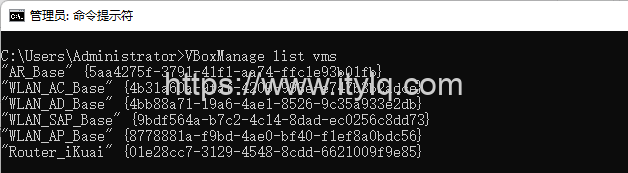
- Start the virtual machine through VBoxManage and set up background startup:

Finally, write a BAT script to add commonly used virtual machines and start/stop it with one click, which is much simpler and less troublesome.
Attachment: Other commands of VBoxManage
//View virtual details
VBoxManage list vms –long
//View running virtual machines
VBoxManage list runningvms
//Start the virtual machine and enable remote desktop connection support
VBoxManage startvm
-type vrdp //Change the remote connection port of the virtual machine for multiple vbox virtual machines to run at the same time
VBoxManage controlvm
vrdpprot //Shut down the virtual machine
VBoxManage controlvm
acpipowerbutton //Force shut down the virtual machine
VBoxManage controlvm
poweroff
This article was moved from WordPress to MkDocs