How to use wordpress article pagination function
Original link: https://www.itylq.com/wordpress-tips-for-paging.html
Release date: 2022-09-17 Migration time: 2026-03-21
WordPress has its own article pagination function, but it may not turn the page until you scroll down with the mouse wheel N times, which makes the user experience broken. Let’s try manual paging first.
- Find the single.php file in the theme directory of the currently used theme, and locate the following line of code:
This depends on different themes, and some may have multiple calls/references, such as this theme: ./single.php->./layouts/single/single.php->./layouts/single/view.php
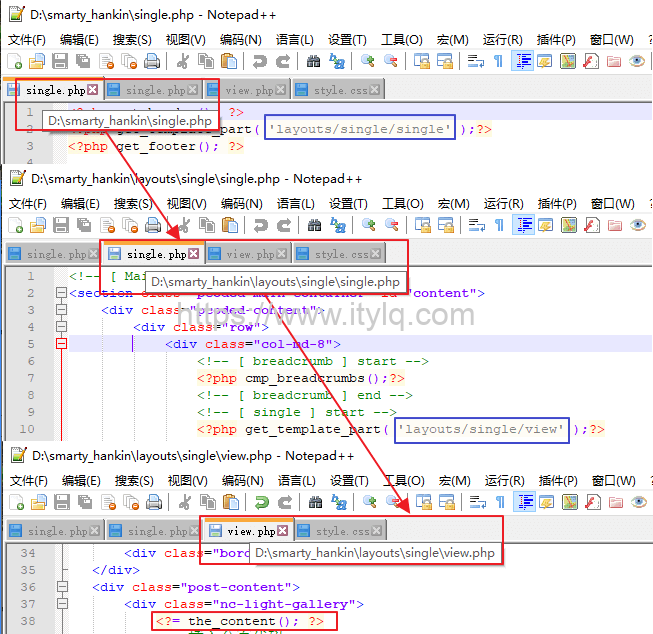
In short, no matter how many times you call it, you can finally find the file where the code is located.
- Insert paging code after the
<?=the_content(); ?>code line, as detailed below:
<?php
$args = array(
'before' => '<p>' . __('Pages:'),
'after' => '</p>',
'separator' => ' ',
'nextpagelink' => __('Next page'),
'previouspagelink' => __('Previous page'),
);
wp_link_pages('before=<strong>&after=</strong>&next_or_number=next&previouspagelink=previous page&nextpagelink= ');
wp_link_pages('before=<span class="wp-pagenavi">&after=</span>&next_or_number=number');
echo " ";
wp_link_pages('before=<strong>&after=</strong>&next_or_number=next&previouspagelink= &nextpagelink=Nextpage');
?>
-
Use of manual paging: When editing an article, first switch to the text editing mode where you feel you need paging, and then insert the paging mark <!–nextpage–>.
-
The above pagination logo needs to switch the editing mode each time it is used. In order to facilitate daily use, you can edit the relevant code through the functions.php file under the current theme to integrate the page break function into the article editing toolbar. The effect is as follows:

Code inserted into functions.php:
add_filter('mce_buttons','wp_add_next_page_button');
function wp_add_next_page_button($mce_buttons) {
$pos = array_search('wp_more',$mce_buttons,true);
if ($pos !== false) {
$tmp_buttons = array_slice($mce_buttons, 0, $pos+1);
$tmp_buttons[] = 'wp_page';
$mce_buttons = array_merge($tmp_buttons, array_slice($mce_buttons, $pos+1));
}
return $mce_buttons;
}
Finally, take a look at the final effect of article pagination:

This article was moved from WordPress to MkDocs