WordPress site RSS subscription settings: display full text, only display article abstracts and turn off RSS
Original link: https://www.itylq.com/wordpress-rss-set.html
Release date: 2022-10-04 Migration time: 2026-03-21
Recently, an open source RSS system, FreshRSS, was deployed on the server to subscribe to current affairs news, IT technology blogs and software sharing websites that are frequently viewed daily. It is no longer necessary to open and browse websites one by one, which is very convenient. After checking my website, I found that WordPress supports RSS subscription by default. This article briefly records the common settings for RSS subscription on WordPress sites.
1 RSS article full text display
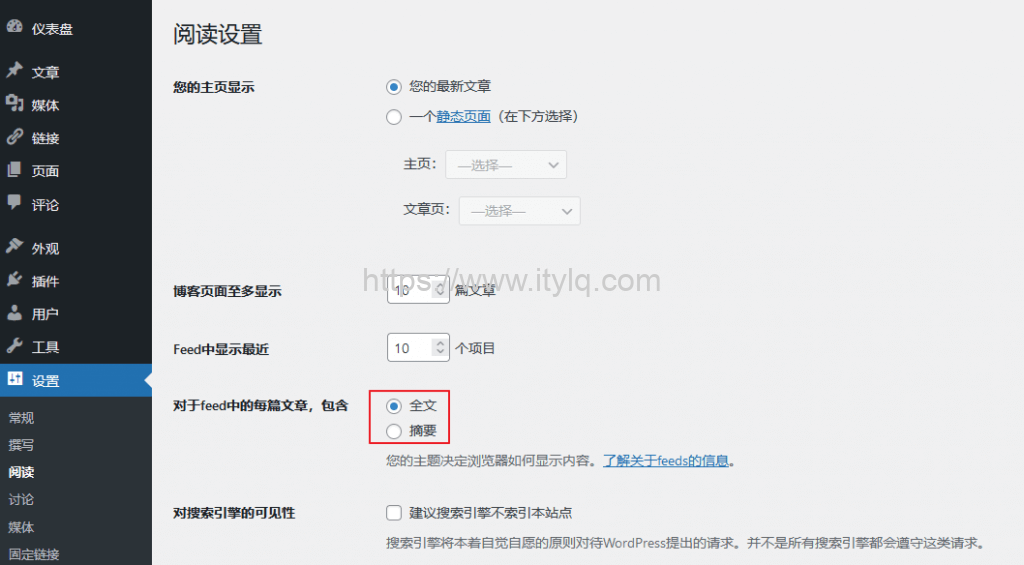
WordPress defaults to full-text display, with a maximum of 10 articles displayed; #The number of articles to be displayed can be customized through the WordPress background
2 RSS only displays article abstracts
In order to guide users to browse more by visiting the website instead of RSS subscription, some websites will make protective settings or directly turn off the RSS subscription function. For example, only the summary information of the article will be displayed. If you need to browse the full text, you can only browse it on the website; #This is not recommended for non-commercial websites. The spirit of the Internet is to remain open and support open source.
The settings are shown in the red box in Figure 1 above. After selecting "Abstract" below and saving, you can only see the article title and summary information through RSS subscription.
3 Close RSS subscription
function disable_feed() {
wp_die( __( 'No feed available, please visit the <a href="https://www.itylq.com">www.itylq.com</a>!' ) );
}
add_action('do_feed', 'disable_feed', 1);
add_action('do_feed_rdf', 'disable_feed', 1);
add_action('do_feed_rss', 'disable_feed', 1);
add_action('do_feed_rss2', 'disable_feed', 1);
add_action('do_feed_atom', 'disable_feed', 1);
add_action('do_feed_rss2_comments', 'disable_feed', 1);
add_action('do_feed_atom_comments', 'disable_feed', 1);
This article was moved from WordPress to MkDocs