WordPress customizes email content such as email verification codes, new registered users, password reset retrieval, and account deactivation.
Original link: https://www.itylq.com/wordpress-email-custom-settings.html
Release date: 2023-06-18 Migration time: 2026-03-21
I have been putting up with the emails automatically sent by this website for a long time. I can’t bear to look directly at the machine-translated Chinese and ugly text layout interface. Take advantage of the free time this weekend to manually adjust it. Show off the finished product first, it feels pretty good:
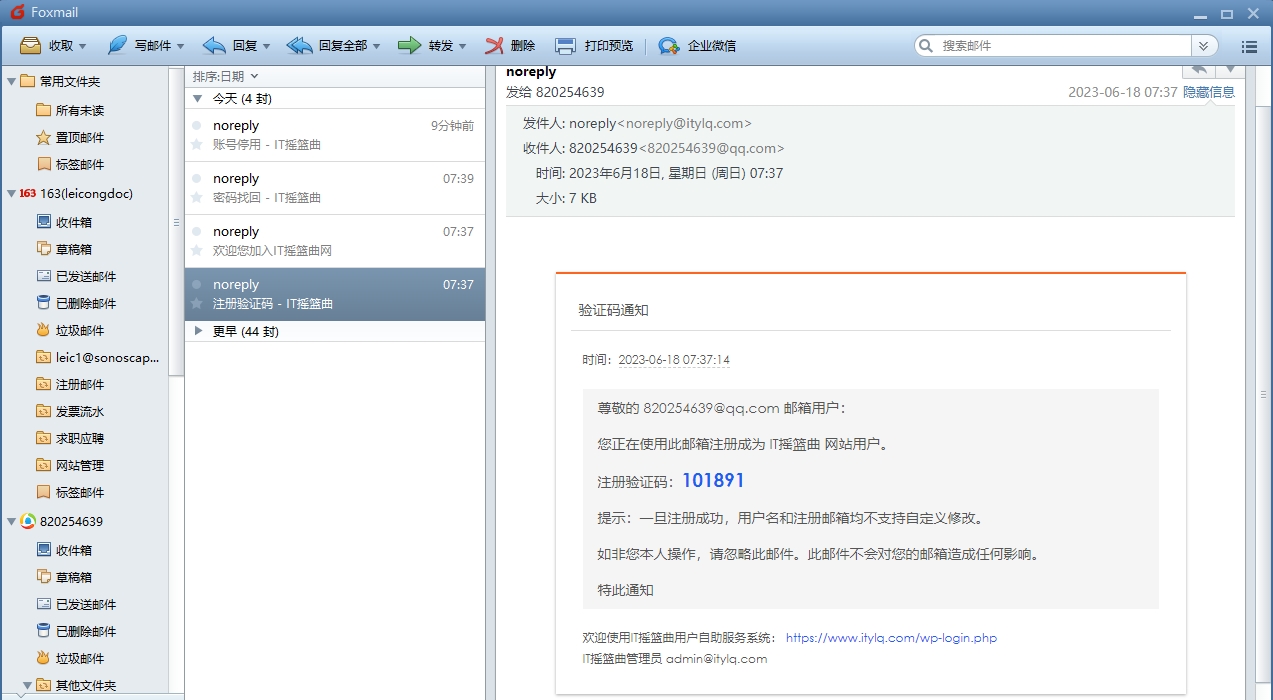
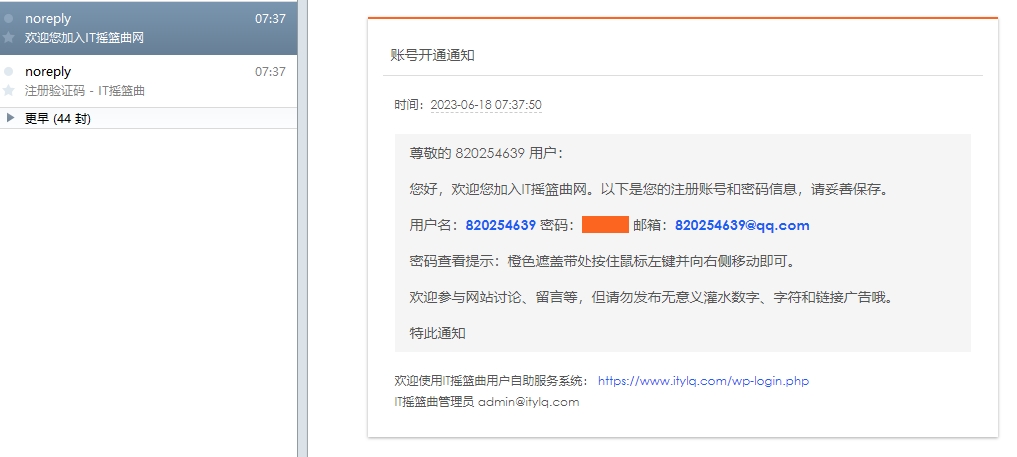
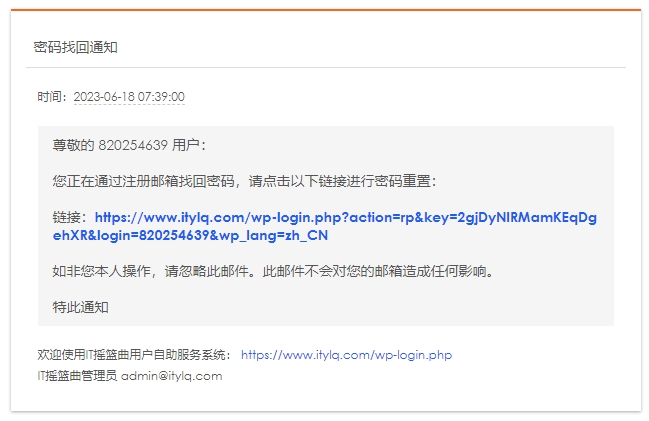
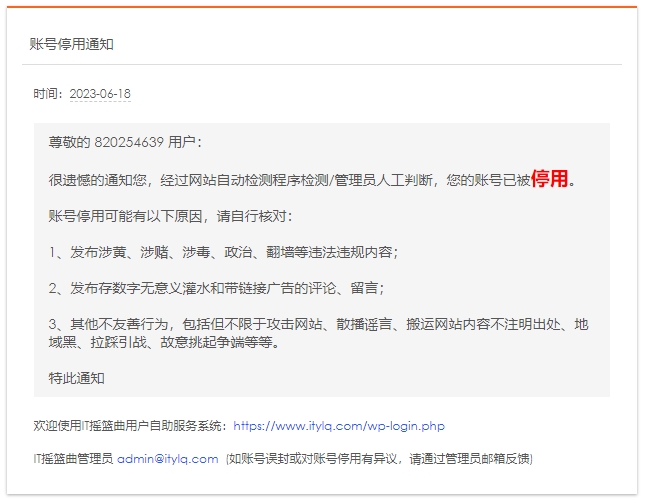
Share the email template html source code:
<main style="margin: 50px auto; padding: 0px 15px 9pt; width: 600px; border-top: 2px solid rgb(252, 101, 31); background-color: rgb(255, 255, 255); box-shadow: rgb(170, 170, 170) 0px 1px 3px; color: rgb(85, 85, 85); font-size: 9pt; font-family: "Century Gothic", "Trebuchet MS", "Hiragino Sans GB", Microsoft Yahei, Tahoma, Helvetica, Arial, SimSun, sans-serif; line-height: 180%;">
<h2 style="padding: 13px 0px 10px 8px; border-bottom: 1px solid rgb(221, 221, 221); font-weight: 400; font-size: 14px;">Account deactivation notification</h2>
<div class="detail-container" style="margin-top: 18px; padding: 0px 9pt;">
<p class="detail-date">
Time: <span style="background-color: rgba(0, 0, 0, 0); color: rgb(85, 85, 85); font-size: 9pt; border-bottom: 1px dashed rgb(204, 204, 204);"></span><span style="background-color: rgba(0, 0, 0, 0); color: rgb(85, 85, 85); font-size: 9pt; border-bottom: 1px dashed rgb(204, 204, 204);">2023-06-18</span></p>
<p class="detail-content" style="margin: 18px 0px; padding: 10px 15px; border: 0px solid rgb(221, 221, 221); background-color: rgb(245, 245, 245); white-space: normal; font-size: 14px; line-height: 18px; word-break: break-all;">Dear user 820254639:
<br>
<br>We regret to inform you that after detection by the website's automatic detection program/manual judgment by the administrator, your account has been <span style="font-size: 19px;"><font color="#ff0000"><b>deactivated</b></font></span>.
<br>
<br>Account deactivation may be due to the following reasons, please check by yourself:
<br>
<br>1. Publish illegal and illegal content related to pornography, gambling, drugs, politics, circumvention, etc.;
<br>
<br>2. Post comments and messages that contain meaningless digital spam and link advertisements;
<br>
<br>3. Other unfriendly behaviors, including but not limited to attacking websites, spreading rumors, moving website content without indicating the source, geographically blackmailing, causing conflicts, deliberately provoking disputes, etc.
<br>
<br>Notice</p><p></p>
<p class="info">
</p><p>Welcome to the IT Lullaby user self-service system: <a href="https://www.itylq.com/wp-login.php" target="_blank" rel="noopener" style="color: rgb(28, 96, 243); text-decoration: none;">https://www.itylq.com/wp-login.php</a></p><span style="color: rgb(85, 85, 85); font-size: 9pt; background-color: rgba(0, 0, 0, 0);">IT Lullaby Administrator</span><span style="font-size: 9pt;"> </span><a href="mailto:admin@itylq.com " style="font-size: 9pt; color: rgb(28, 96, 243); text-decoration: none;">admin@itylq.com </a><span style="color: rgb(85, 85, 85); font-size: 9pt; background-color: rgba(0, 0, 0, 0);"> (If the account is blocked by mistake or you have any objection to the account deactivation, please provide feedback through the administrator's email)</span><p></p>
</div>
</main>
Setting up unattended self-response emails can be achieved through third-party WordPress plug-ins, such as WP Mail SMTP, etc. It is very simple to get started. After installing the plug-in, just adjust each email module page by referring to the above email HTML template. Of course, you can also implement it in pure code without using plug-ins. Just use hooks to replace the WordPress native email content and style.
Due to limited space, the following is an excerpt of the password retrieval email content and format replacement implemented by me using the hook function. The content and format settings of email verification codes, new user registration notifications, and account deactivation emails have similar principles and are omitted here.
//Password retrieval email text customization
function dmd_filter_retrieve_password_notification_email( $defaults, $key, $user_login, $user_data ){

// Use the three parameters $key, $user_login, $user_data to obtain and transfer user information to achieve dynamic email content
//Automatically obtain the current time as the email sending time and manually set the time zone to PRC China
date_default_timezone_set('PRC');
$sendtime = date("Y-m-d H:i:s");
$defaults['headers'] = "MIME-Version: 1.0\n" . "Content-Type: text/html;"; //Normally no modification is required
//$defaults['title'] = "Password Retrieval - IT Lullaby"; //Doesn't work... The following is implemented through a custom email title hook function
$defaults['message'] = '
<meta charset="UTF-8">
<title>Password Retrieval - IT Lullaby</title>
<style>main { margin: 50px auto; padding: 0px 15px 9pt; width: 600px; border-top: 2px solid rgb(252, 101, 31); background-color: rgb(255, 255, 255); box-shadow: rgb(170, 170, 170) 0px 1px 3px; color: rgb(85, 85, 85); font-size: 9pt; font-family: "Century Gothic", "Trebuchet MS", "Hiragino Sans GB", Microsoft Yahei, Tahoma, Helvetica, Arial, SimSun, sans-serif; line-height: 180%; }main h2 { padding: 13px 0px 10px 8px; border-bottom: 1px solid rgb(221, 221, 221); font-weight: 400; font-size: 14px; }main a { color: rgb(28, 96, 243); text-decoration: none; }.detail-container { margin-top: 18px; padding: 0px 9pt; }.detail-container > p.detail-date > span { border-bottom: 1px dashed rgb(204, 204, 204); }.detail-container > p.detail-content { margin: 18px 0px; padding: 10px 15px; border: 0px solid rgb(221, 221, 221); background-color: rgb(245, 245, 245); }.detail-container > p.detail-content { white-space: normal; font-size: 14px; line-height: 18px; word-break: break-all; }</style>
<main>
<h2>Password recovery notification
</h2>
<div class="detail-container">
<p class="detail-date">
Time: <span style="background-color: rgba(0, 0, 0, 0); color: rgb(85, 85, 85); font-size: 9pt;">'.$sendtime.'</span></p>
<p class="detail-content">Dear '.$user_login.' user:
<br>
<br>You are retrieving your password through your registered email address. Please click the following link to reset your password:
<br>
<br>Link:<font color="#1c60f3" style="font-size: 14px;"><b><a href="'."https://www.itylq.com/wp-login.php?action=rp&key=".$key."&login=".rawurlencode($user_login)."&wp_lang=zh_CN".'" target="_blank" title="IT Lullaby User Password Reset">'."https://www.itylq.com/wp-login.php?action=rp&key=".$key."&login=".rawurlencode($user_login).'&wp_lang=zh_CN</a></b></font>
<br>
<br>If you are not responsible for this, please ignore this email. This email will not have any impact on your mailbox.
<br>
<br>Notice hereby
</p>
<p class="info">
<p>Welcome to the IT Lullaby user self-service system:
<a href='."https://www.itylq.com/wp-login.php".' target="_blank" rel="noopener">'."https://www.itylq.com/wp-login.php".'</a>
<br>
IT Lullaby Administrator '."admin@itylq.com".'
</p>
</div>
</main>
';

return $defaults;
}
add_filter( 'retrieve_password_notification_email', 'dmd_filter_retrieve_password_notification_email', 10, 4 );
//Password retrieval email title customization
function dmd_filter_retrieve_password_title(){
$re_email_title = "Password Retrieval - IT Lullaby";
return $re_email_title;
}
add_filter('retrieve_password_title','dmd_filter_retrieve_password_title',10,4);

// Password change notification emails are prohibited from being sent. Self-service password retrieval is enough.
add_filter('send_password_change_email', '__return_false');
This article was moved from WordPress to MkDocs