title: "The sitemap.php file reported an error "Warning: Use of undefined constant GMT - assumed 'GMT' (this will throw an Error in a future version of PHP) "" date: 2022-10-05 tags: - sitemap.xml - php version - GMT constant thumbnail: ../../assets/images/2026/03/21/php-warning-undefined-gmt-1.png original_url: https://www.itylq.com/php-warning-undefined-gmt.html
The sitemap.php file reported an error "Warning: Use of undefined constant GMT - assumed 'GMT' (this will throw an Error in a future version of PHP)"
Original link: https://www.itylq.com/php-warning-undefined-gmt.html
Release date: 2022-10-05 Migration time: 2026-03-21
I occasionally checked the website sitemap.xml file record and found a line of error message Warning: Use of undefined constant GMT – assumed ‘GMT’ (this will throw an Error in a future version of PHP). sitemap.xml is updated regularly by the sitemap.php file in the website background. The cause of the problem should be in the .php file.

Open the sitemap.php file in the background and locate the code location based on the keyword "GMT" and code line number in the error message:
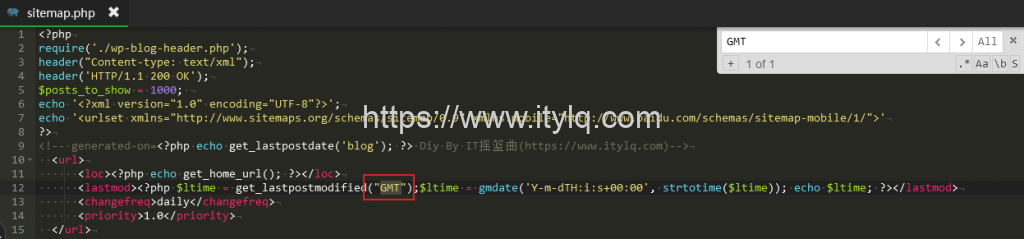
As a constant, GMT can be entered directly in lower versions of PHP; in higher versions of PHP, " " must be added, otherwise PHP will not recognize it. Therefore, just add English double quotes to the GMT string and the problem will be solved.
This article was moved from WordPress to MkDocs