Delete quick access in win7/win10/win11 explorer navigation window
Original link: https://www.itylq.com/win7-win10-win11-fast-access-hide.html
Release date: 2022-11-06 Migration time: 2026-03-21
The navigation pane of Windows 7/10/11 File Explorer displays "Quick Access" by default, and the latest opened file libraries, folders, files and other records will be displayed in "Quick Access". Although it has its convenience, for the sake of privacy or to make the resource manager more concise, how to delete the "Quick Access" icon and the record information in it from the navigation window?
The above requirements can be achieved by modifying the registry entries.
- Press the "win+R" key combination to quickly open the "Run" window, and enter "regedit" to open the registry manager:
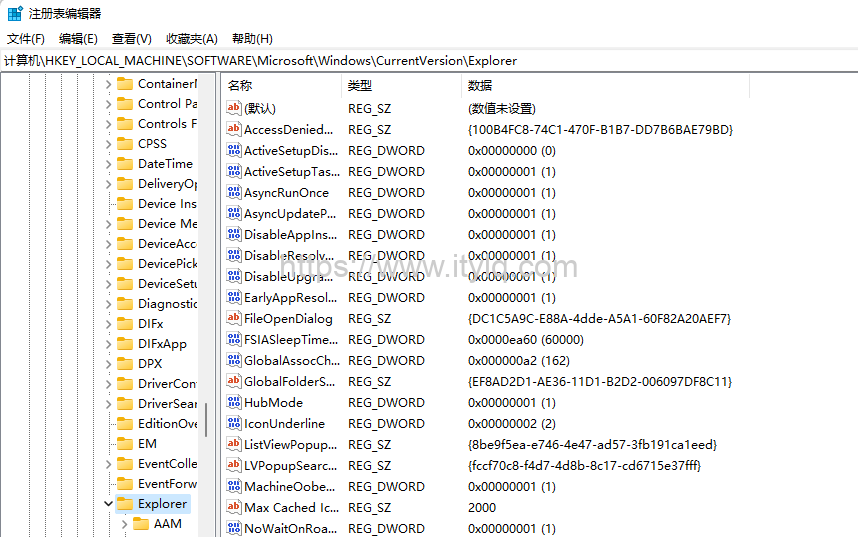
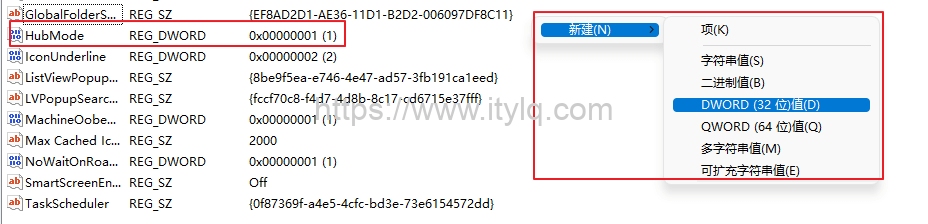
- Expand "Computer\HKEY_LOCAL_MACHINE\SOFTWARE\Microsoft\Windows\CurrentVersion\Explorer" in turn, then right-click to create a new "DWORD (32-bit) value D", change the name to "HubMode", the value is "1": //Value 1, hide quick access; value 0, show quick access
After saving, exit the registry manager and reopen the resource manager. The quick access has disappeared:

This article was moved from WordPress to MkDocs