BAT script: Obtain the main hardware configuration information of the computer with one click and automatically generate a record file (Plus++ enhanced version)
Original link: https://www.itylq.com/bat-pc-hardware-info-plus.html
Release date: 2022-09-19 Migration time: 2026-03-21
Previously, the configuration parameters of the computer's CPU, memory, hard disk, graphics card, network card and other components were obtained through the wmic system component. Although it was somewhat helpful in assessing computer performance bottlenecks, the hardware description information was not detailed enough and there were some shortcomings. For example, only the size of the memory is displayed. Is it DDR3 generation or DDR4 generation? If you want to upgrade the memory, how many memory slots does the motherboard have? Can you add new ones directly? ...When there are new requirements, there is a need for improvement. This article initially discusses the practice of calling third-party hardware detection software through bat scripts to automatically obtain more detailed configuration information of computer components.
1 BAT requirement
-
Obtain more detailed parameter information of computer components;
-
Other requirements are similar to the article [BAT script: obtain the main hardware configuration information of the computer with one click and automatically generate a record file] (./bat-pc-hardware-info.md).
2 Third-party hardware detection software
After searching around, a certain expert ruled it out first and found that the hardware detection functions supported by AIDA64 are many and detailed. I flipped through the official documentation of AIDA64 and found out that it supports command line execution. I was pleasantly surprised like a gust of wind, don’t come too quickly~ Then, I entered the cycle of trial and error of downloading green software, installation-free software, and constantly changing software versions. I followed the official command line format and tested various fancy methods. No response was found, which was very embarrassing. Finally, I found this paragraph from the official AIDA64 reply to the user consultation page:
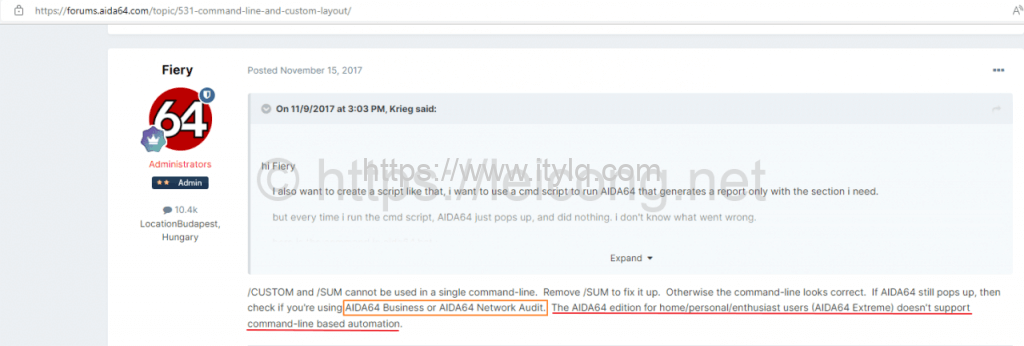
Only the online version and the commercial version support the command line...ah...this pit is so big and deep...
3 Preparation
-
Download the AIDA64 Business version green software and extract it to a USB flash drive;
-
Double-click to open the AIDA64 software, customize the report configuration file as needed and save it as XX.rpf, and then copy XX.rpf to the directory where AIDA64.exe is located.
4 BAT code details
@echo off & title One-click collection of local computer configuration information (Plus++ enhanced version)---Author: itylq.com
echo One-click collection of local computer configuration information (Plus++ enhanced version)
echo.
echo ----------------------------------
::custom username
set /p names=Step1. Please enter the user name:
echo.
::Set information saving path
set Upath=%~dp0
echo detects that the current U disk path is: %Upath%
echo.
echo Step2. Hardware information is automatically collected...
set aidaEXE=%Upath%\aida64
set reportFile="%Upath%"Brief information about local configuration (%names%).txt
set rpfFile=%Upath%\aida64\fastmodel.rpf
cd /D %aidaEXE%
aida64 /R %reportFile% /CUSTOM %rpfFile% /TXT /SILENT /SAFE
::Add MAC address information
ipconfig/all >>%reportFile%
echo.
echo collection completed.
echo.
timeout /T 2 >nul
echo Step3. The configuration information is automatically exported to the USB disk...
echo.
echo export completed.
timeout /T 1 >nul
echo ----------------------------------
echo.
echo The computer configuration information collection task ends.
echo.
pause
5 Execution results
Before executing the BAT script, you need to close and exit the AIDA64 software. The collected hardware information is shown in the figure below:

It can be seen that the computer component information collected through AIDA64 is more comprehensive and detailed. For example, it will display the memory generation and number of memory slots supported by the motherboard; display parameters such as hard disk manufacturer, model, capacity, and interface; display graphics card model, video memory size, etc., which is very convenient for subsequent configuration upgrades. In addition to supporting the generation of report information, AIDA64 also supports real-time performance testing of various computer components. For example, in a domain environment, batch detection testing and return of test results can be performed by pushing bat scripts. In short, calling AIDA64 through scripts avoids the time-consuming and laborious installation of detection software on the user side, and also makes the hardware information collected more detailed and effective.
This article was moved from WordPress to MkDocs