BAT script: Create and import AD domain OU and User in batches
Original link: https://www.itylq.com/bat-create-ad-ou-and-user-csv.html
Release date: 2022-09-19 Migration time: 2026-03-21
For management needs, AD domains have recently been deployed for management and control. Although the organizational structure is not complicated and there are not too many people, it is impossible to create them manually one by one, absolutely impossible. In the past, dsadd user and dsadd ou were used many times, but unfortunately they were not used for a while. I almost forgot the command format and parameters, and it was very annoying to have to look up the information again. So, I came up with an idea. Can I write a script with a slightly wider applicability? No matter which company's AD I want to create in the future, I can just adjust the format of the employee address book according to the template and import it with one click? Well, it's worth trying.
1 OU organization creation
Create a three-level organization under the test.com domain: XX Center-XX Department-XX Group
It is worth noting that the creation of OU has a hierarchical relationship. The XX center must be created first, and then the XX department can be created. Finally, the above command can be used to successfully create the XX group.
dsadd ou "ou=XX center,dc=test,dc=com"
dsadd ou "ou=XX department,ou=XX center,dc=test,dc=com"
dsadd ou "ou=XX group,ou=XX department,ou=XX center,dc=test,dc=com"
2 User user import
dsadd user "cn=user,ou=XX group,ou=XX department,ou=XX center,dc=test,dc=com" -upn login name@test.com -samid login name -pwd password -display display name -tel phone number -email mail -ln last name -fn first name -title position
User import depends on the existence of the OU organization, so the OU must be created before you can import users to the corresponding organization.
The difference between User creation and OU creation is that the dsadd user command can carry a large number of command parameters to assign values to User. As mentioned above, you can set the user login name, password, display name, contact number, email address, job title, etc.
Note that the UPN value has unique characteristics, so if there are more than two users with the same "login name@test.com", User user creation will fail. In addition, if the corresponding command parameter is added, the parameter can be set to "NULL" for the employee address book column, but it cannot have a null value.
3 Loop to obtain the employee address book.csv list information and assign values to OU and User
for /f "skip=ignore the number of rows tokens=1-20 delims=," %%a in (employee address book.csv) do (
::OUCreate
dsadd ou "ou=%%b,dc=%%f,dc=%%g"
dsadd ou "ou=%%c,ou=%%b,dc=%%f,dc=%%g"
dsadd ou "ou=%%d,ou=%%c,ou=%%b,dc=%%f,dc=%%g"
dsadd ou "ou=%%e,ou=%%d,ou=%%c,ou=%%b,dc=%%f,dc=%%g"
::User import
dsadd user "cn=%%a,ou=%%e,ou=%%d,ou=%%c,ou=%%b,dc=%%f,dc=%%g" -upn %%h%domains% -samid %%i -pwd %%j -display %%k -ln %%l -fn %%m -dept %%n -tel %%o -title %%p -email %%q
bat can directly read csv, txt and other format files, %%a corresponds to column A of the csv file.
4 Partial screenshots of batch creation of OU and User

The final effect in AD users and computers: #Multi-layer organizations and users are automatically created
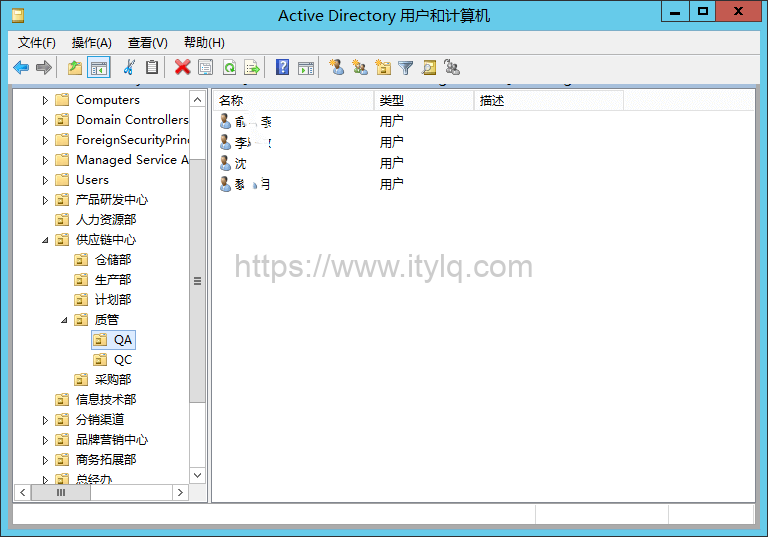
5 Finished product and operating instructions
Operating Instructions:
(1) Sort the employee address book CSV files according to the first-level, second-level, third-level, and fourth-level organizations. People in the first-level organization are given priority, and those in the fourth-level organization last. #The purpose is to locate the starting line number of organizations at all levels to facilitate bat loop jumps
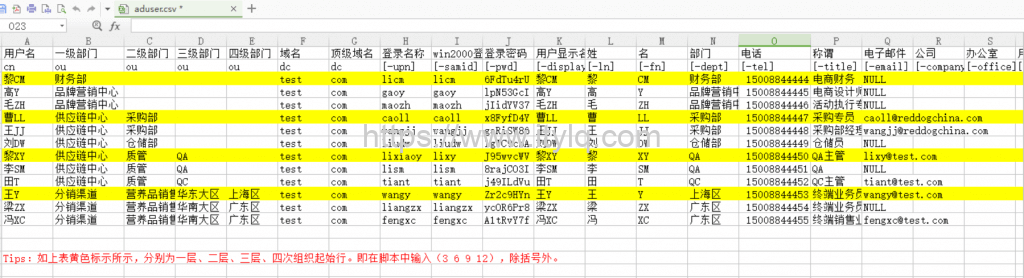
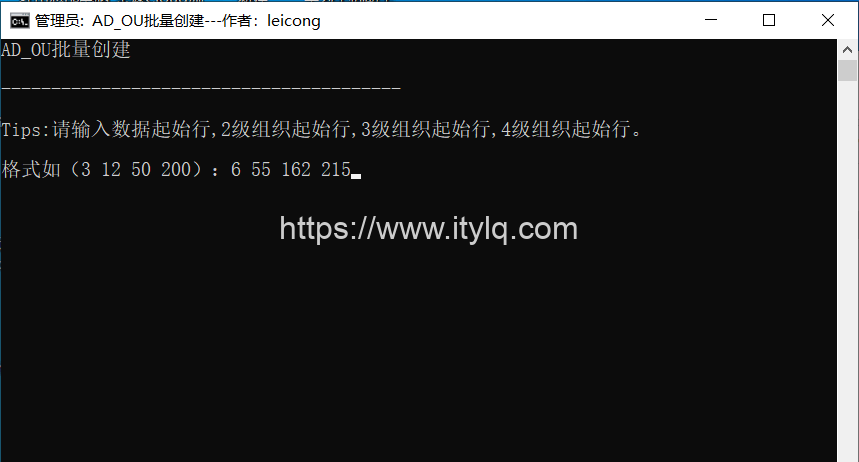
(2) Run the AD_OU batch creation .bat or two-in-one script, enter the starting line number of the organization at each level, separated by spaces, as shown in the figure above, you need to enter 3 6 9 12 to automatically create the OU organization:
(3) Run the AD_User batch import .bat script, enter the AD domain name and the starting line number of the organization at all levels, and automatically import User:
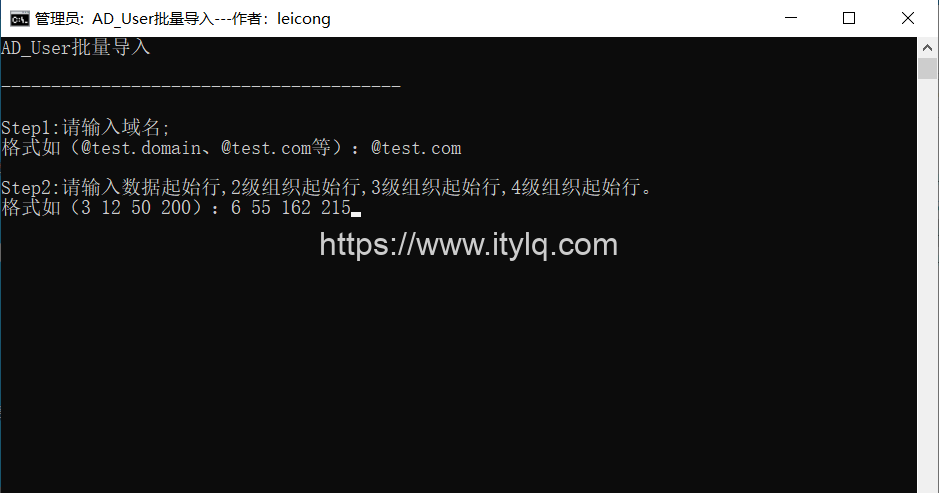
Completed. In the future, you only need to use the "aduser.csv" file as a template to organize the employee address book information collection, and then ruthlessly double-click to run the AD_OU, AD_User batch script tool or two-in-one tool to create it automatically and perfectly. You no longer need to spend a lot of time to write scripts repeatedly~
Attached:
-
AD domain general solution package: AD_OU batch creation script, AD_User batch import script and aduser template.zip
-
AD domain general solution package: AD_OU batch creation and AD_User batch import two-in-one script and aduser template.zip
Note: The difference between attachments 1 and 2 is that attachment 2 integrates the batch creation and import of OU and User into a bat file for processing, and other functions are the same.
This article was moved from WordPress to MkDocs