HUANANZHI/South China Gold Medal X99 Motherboard BIOS Settings AC Recovery
Original link: https://www.itylq.com/huananzhi-x99-bios-ac-recovery.html
Release date: 2023-01-17 Migration time: 2026-03-21
I am going back to my hometown during the Chinese New Year. It is difficult to take the high-performance computer I use for work home, so I simply get a smart socket to connect to the power supply of the host computer. When I need to use it, I can remotely turn it on + remote desktop to handle some temporary work. When setting up the smart socket, it prompts that the AC Recovery function of the computer motherboard needs to be turned on. The host motherboard I use for work is the South China Gold Medal X99. The South China Gold Medal board is a bit different from the AC Recovery settings of general motherboard manufacturers. Take a note:
-
Press the delete key on the computer to enter the motherboard BIOS interface;
-
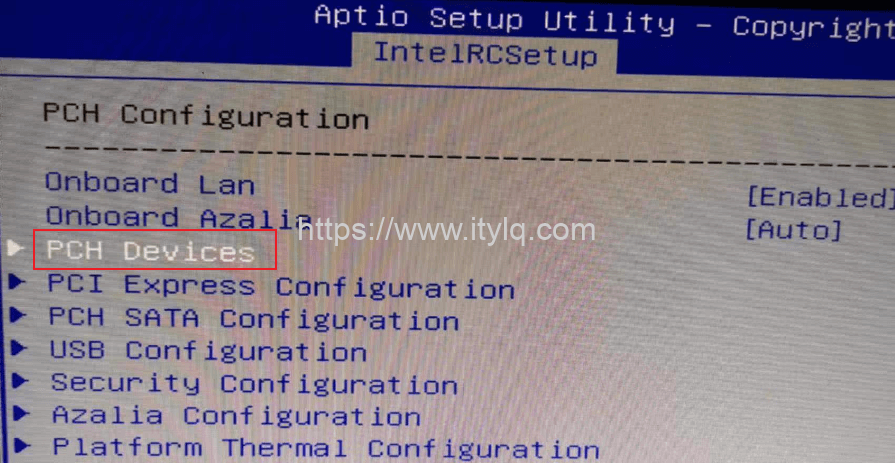
Switch to the "IntelRCSetup" main menu, select and enter "PCH Configuration";

- Select and enter "PCH Devices";
- Select "Power On" in "Restore AC after Power Loss", press F4 to save and exit;
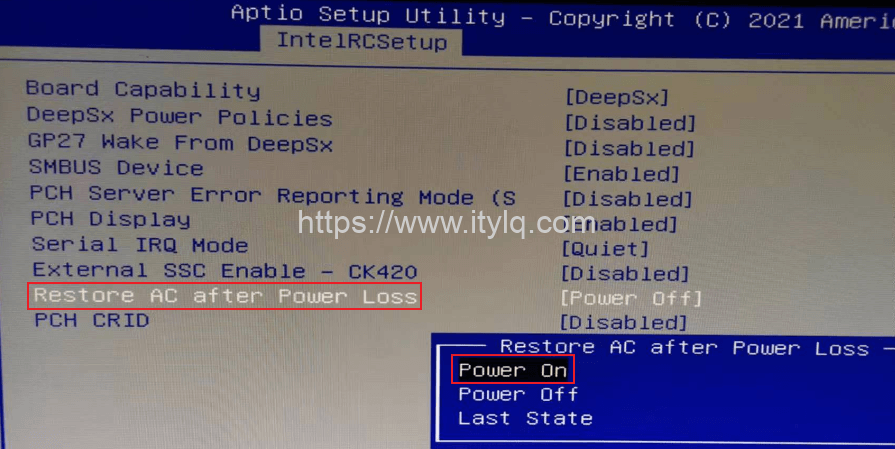
Note: "Restore AC after Power Loss" is equivalent to "AC Recovery", which means "AC power loss recovery", that is, the external AC power supply of the computer host is accidentally powered off and the host performs the default action (after a call is received). Power On, turn on the computer after a call; Power Off, turn off the computer after a call; Last State, restore the host to the state before power outage.
This article was moved from WordPress to MkDocs