Solve the problem of parameter error when modifying disk drive letter in windows system
Original link: https://www.itylq.com/windows-disk-parameter-error.html
Release date: 2023-03-27 Migration time: 2026-03-21
1 Problem description
Recently, I encountered a small problem. When changing the disk drive letter for a certain computer, it first prompted "Some programs that rely on drive letters may not be able to run. Do you want to continue?", and after confirmation, an error message of "Parameter error" appeared. As shown in Figure 1 below:

2 Solution
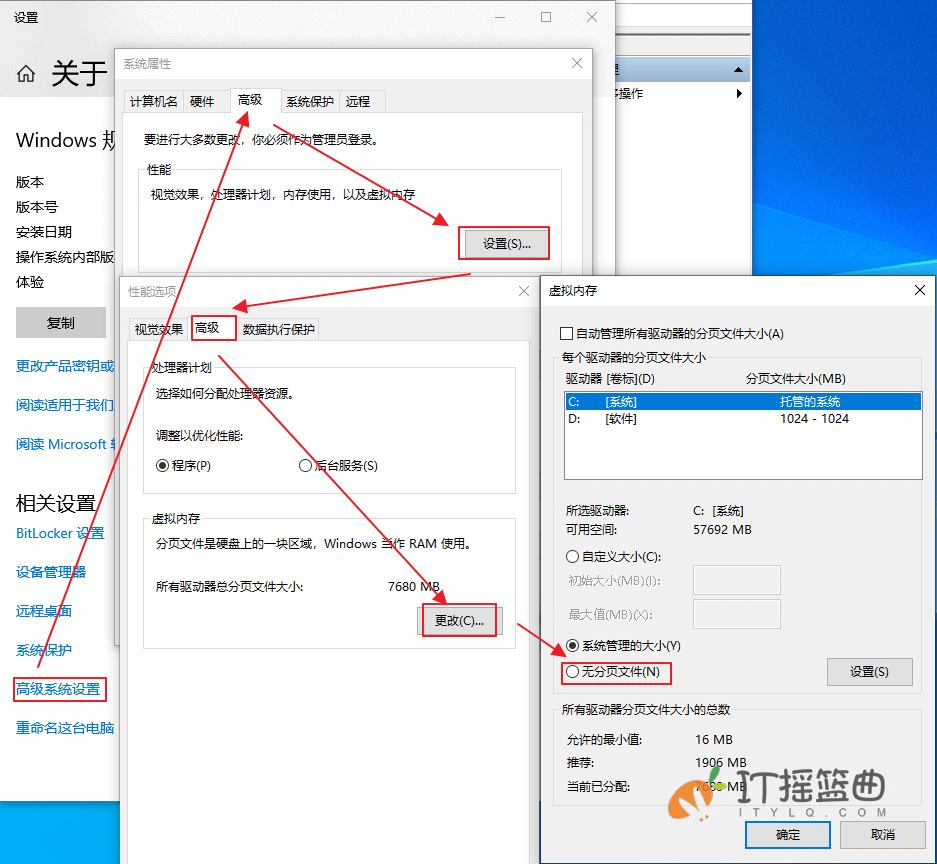
Just close the virtual memory/paging file on the logical disk. Detailed operations are as follows:
Right-click "My Computer" -> "Properties" -> "Advanced System Settings" -> Performance "Settings" -> "Advanced" -> Virtual Memory "Change" -> Uncheck "Automatically manage paging file size for all drives (A)", select the logical disk that needs to change the drive letter, select "No paging file (N)" and click "Settings (S)", confirm, and then restart the computer to take effect. Finally, modify the disk drive letter through disk management and it will be OK.
3 Extensions
Finally, let’s discuss virtual memory. The demand or technology of virtual memory emerged in the era when Windows 7 system was the mainstream. The purpose was to solve the problem of slow loading caused by too large programs or files and generally insufficient memory capacity. In the Windows 7 era, memory prices were generally high, so the memory capacity of most standard computers was 2GB/4GB. Virtual memory in that era effectively alleviated the problem of slow loading caused by insufficient memory.
Anyone who has studied computer principles knows that the operating speed of computer components "Register > Level 3 Cache > Memory > Virtual Memory > Disk", so in the current era where win10 and win11 systems are the mainstream, and memory often starts at 8GB or 16GB, and 32GB or 64GB is also common, the memory capacity is sufficient, even abundant to the point of waste. The technology of virtual memory no longer makes much sense from the perspective of accelerating program/file loading. Now, setting up virtual memory will not only have no acceleration effect, but will actually slow down the loading of programs/files.
So, it’s time to turn off and deactivate virtual memory/paging file on Windows system.
This article was moved from WordPress to MkDocs