What should I do if I get the message "In use, operation cannot be completed" when deleting or renaming files and folders?
Original link: https://www.itylq.com/file-folder-occupied-problem.html
Release date: 2023-05-04 Migration time: 2026-03-21
In daily use, we often encounter situations where files/folders cannot be deleted or renamed. Except for a few software that perform rogue behaviors such as modifying file user permissions, the root cause of most problems is that when files and folders are deleted or renamed, they are already occupied by other programs.

How to check what program is occupying the current file/folder and unoccupy it?
-
Win+R opens the permission window, enter "taskmgr" to open the task manager; //or use the shortcut key combination [Ctrl+Shift+Esc]
-
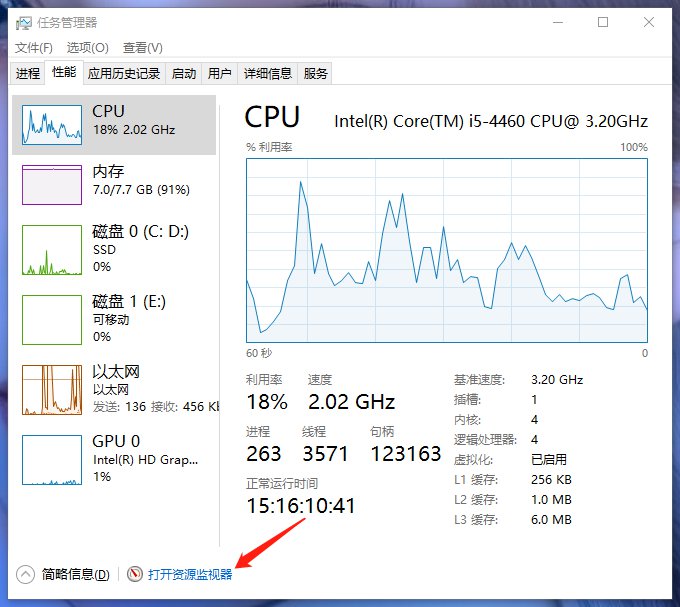
Select [Performance]->[Open Resource Monitor] in the Task Manager;
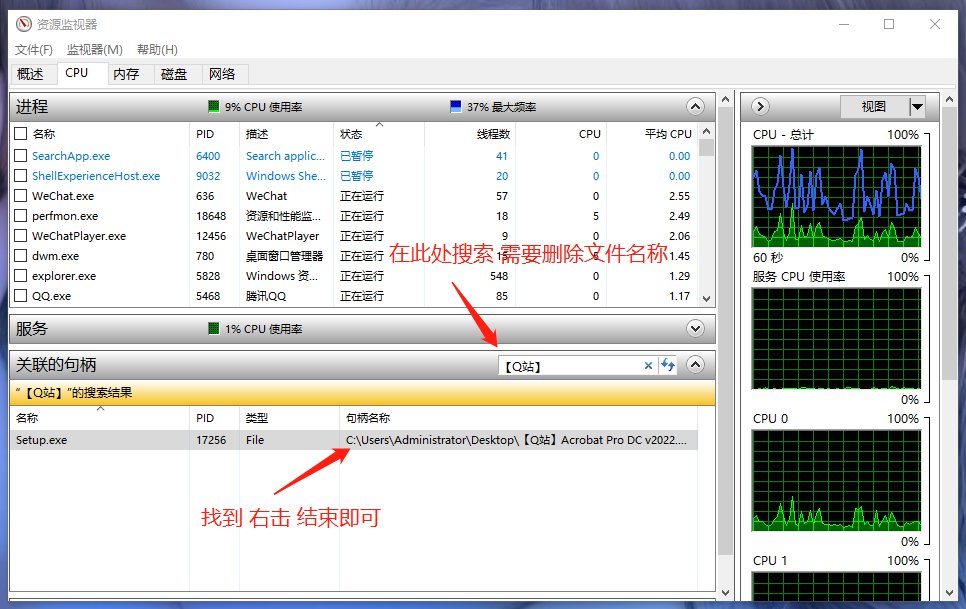
- Select [CPU] -> [Associated Handle] in the Resource Monitor, search for the file/folder name that needs to be operated, find the occupying program, right-click -> End the process. At this point, deleting and renaming files/folders will not be blocked.
In addition to unoccupying it as mentioned above, you can also use some third-party tools to forcibly unblock it, such as IObit Unlocker software and so on.
This article was moved from WordPress to MkDocs