What should I do if a pop-up window always pops up in the upper right corner of Google Chrome when it starts, prompting "Cannot update Chrome"
Original link: https://www.itylq.com/block-chrome-updateprompt.html
Release date: 2023-06-02 Migration time: 2026-03-21
Every time I start Google Chrome, a small window always pops up in the upper right corner prompting "Cannot update Chrome. Chrome cannot be updated to the latest version, so you cannot get the latest features and security fixes. Reinstall Chrome", see Figure 1 below.

It is said that Chrome’s update check mechanism is updated every 2 months. It is very annoying for ordinary users who have the leisure to cooperate with frequent updates. How can I disable this terrible update prompt?
You can disable update pop-up prompts through Chrome’s own startup parameter “–disable-background-networking”. According to general usage habits, we may use Chrome in the following 3 ways, which can be modified one by one:
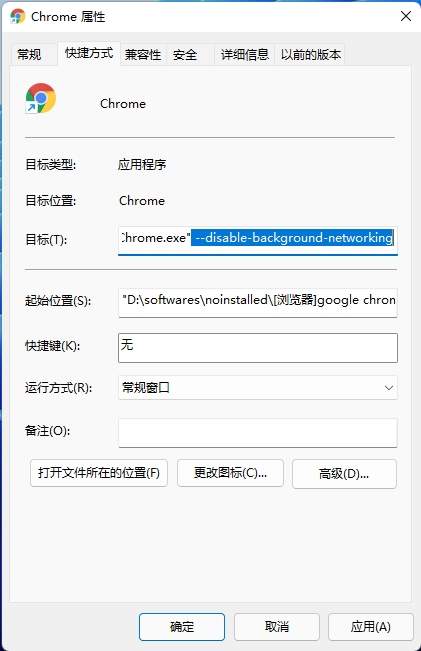
- Desktop shortcut keys: Find the Google Chrome shortcut on the desktop, right-click "Properties", find the "Target (T):" input box in the "Shortcut" menu bar, add "-disable-background-networking" after the existing string, be sure to separate it with spaces.
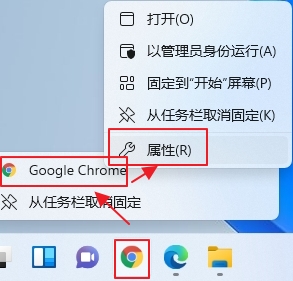
- Taskbar shortcut: Right-click the Google Chrome shortcut on the taskbar, continue to right-click "Google Chrome" in the pop-up "Google Chrome/Unpin from Taskbar" menu, and then select "Properties (R)". In the "Shortcut" menu bar, find "Target (T): "Input box attachment" –disable-background-networking".
- Third-party programs call the Chrome browser: This needs to be achieved by modifying the registry. Expand according to the path "Computer\HKEY_CLASSES_ROOT\ChromeHTML.XXXX···XXXX\shell\open\command", double-click (default), and modify the numerical data in the pop-up box: add –disable-background-networking before %1, note that there are spaces before and after.
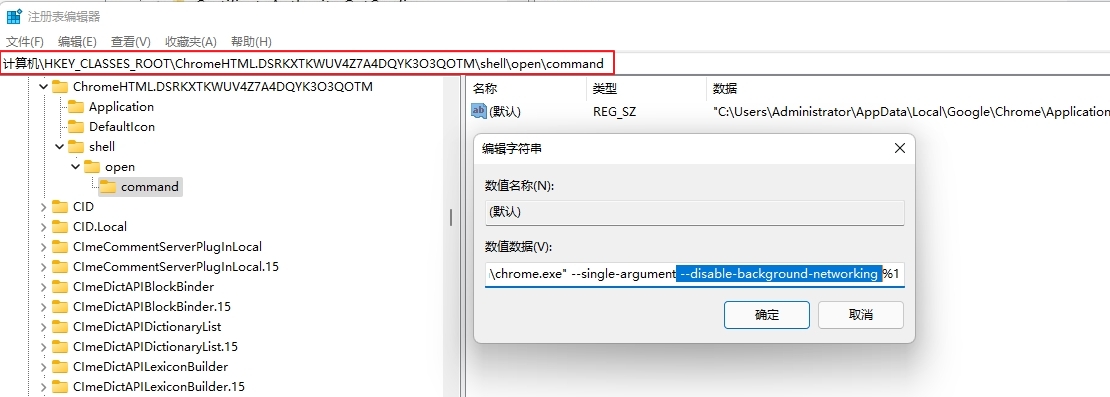
Tips: When expanding the registry path, "ChromeHTML.XXXX···XXXX" will be different in different Windows system versions. There is no need to pay attention to "XXXX···XXXX", as long as the "ChromeHTML." prefix is the same.
In addition, unfortunately, after testing, the "background-networking" related setting items cannot be found through "chrome://flags". Currently, it can only be set as shown above in this article.
Attachment: Commonly used startup parameters for Chrome Google Chrome
–kiosk full screen mode
–app application mode
–disable-desktop-notifications disable desktop notifications
–no-first-run non-first run (avoid some first-run prompts)
–disable-popup-blocking disables pop-up blocking
–incognito anonymous mode (no caching issues at startup)
–disk-cache-size Custom cache size
–profile-directory specifies the personal data folder
–user-data-dir user data directory
–disk-cache-dir Internet cache directory
–disable-infobars No longer receive update prompts on Windows XP systems
–disable-background-networking disables the Chrome version is too old prompt
–no-default-browser-check disable default browser check
This article was moved from WordPress to MkDocs