An article on understanding the differences between USB interface types and USB standards. Still confused? No more pitfalls when purchasing equipment?
Original link: https://www.itylq.com/usb-standards-and-connector-types.html
Release date: 2025-03-12 Migration time: 2026-03-21
1 USB-IF Standards Organization
The USB-IF (USB Implementers Forum) organization is responsible for drafting and publishing USB transmission standard specifications. Since the advent of the USB 1.0 standard in 1996, it has experienced the development of multiple versions of USB 1.1, USB 2.0, USB 3.0, USB 3.1, USB 3.2, and USB 4.
2 USB transmission standard versions and maximum transmission rate
| Standard Version | Release Date | Maximum Transmission Rate | Electrical Characteristics |
|---|---|---|---|
| USB 1.0 | 1996.01 | 1.5 Mbps | 5V / 500mA |
| USB 1.1 | 1998.09 | 12 Mbps | 5V / 500mA |
| USB 2.0 | 2000.04 | 480 Mbps | 5V / 500mA |
| USB 3.2 Gen1 | 2008.11 | 5 Gbps | 5V / 900mA |
| USB 3.2 Gen2 x 1 | 2013.07 | 10 Gbps | 20V / 5A |
| USB 3.2 Gen2 x 2 | 2017.09 | 20 Gbps | 20V / 5A |
| USB 4 | 2019.09 | 40 Gbps | 20V / 5A |
3 USB interface standard
USB interfaces are divided into three types: standard USB interface, Mini USB interface and Micro USB interface.
1.Standard USB interface
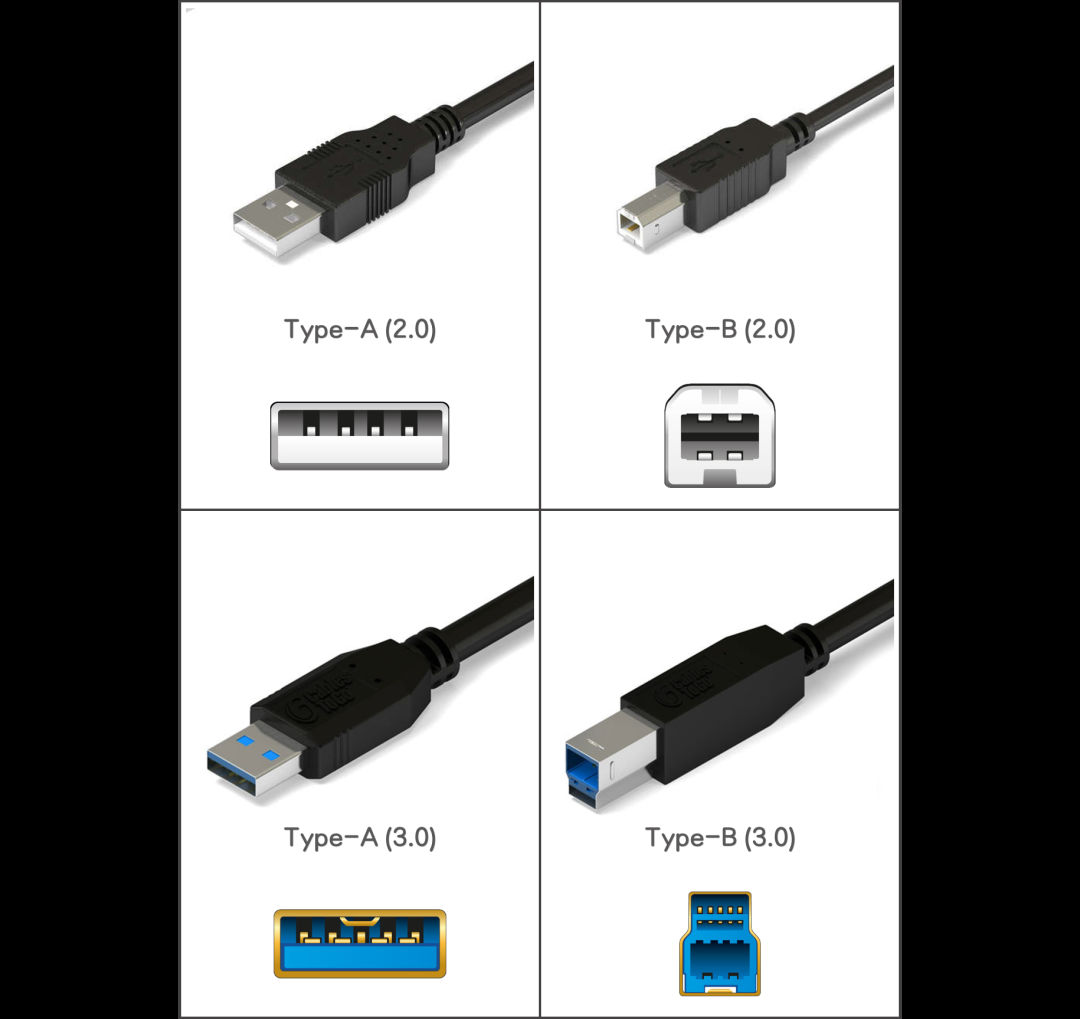
Standard USB interfaces are divided into Type-A and Type-B, as shown below:
-
Distinguish USB 2.0 and USB 3.0 according to the color of the interface. The USB 3.0 interface is generally blue;
-
Type-A and Type-B are distinguished according to the shape of the interface. The flatter Type-A is commonly used on devices such as mice, keyboards, and USB flash drives; while the more three-dimensional and compact Type-B is commonly used on devices such as printers, docking stations, and special monitors.
2.Mini USB interface
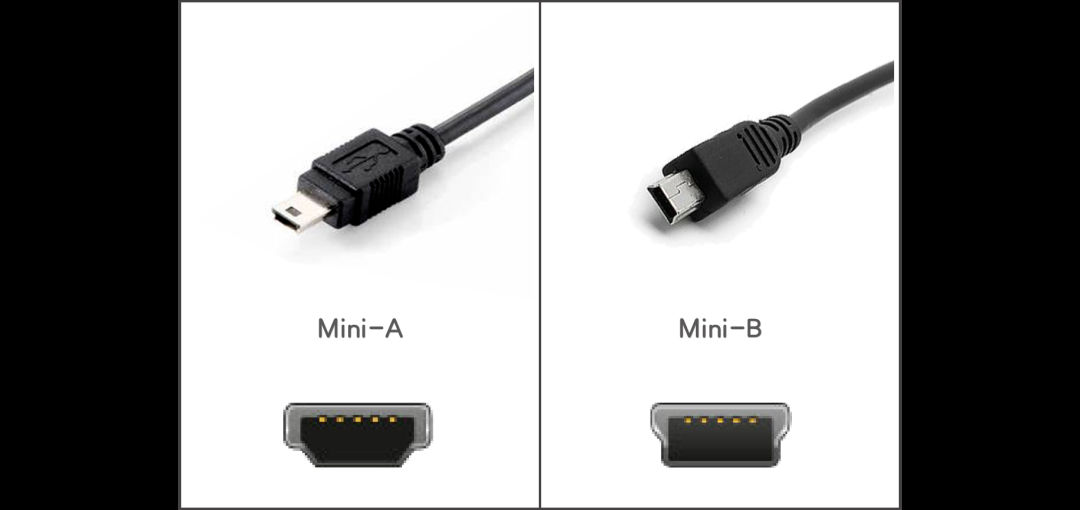
Compared with the standard USB interface, it is a smaller USB interface. It is also divided into two types: Mini-A and Mini-B. The diagram is as follows:
-
Distinguish between standard USB interface and Mini USB interface based on appearance. Mini USB interface is smaller and trapezoid-shaped;
-
Mini-A and Mini-B are also distinguished based on their appearance. Mini-A is flatter.
Mini USB interfaces are often used on small devices, such as MP3, MP4, radios and early button function mobile phones.
3.Micro USB interface
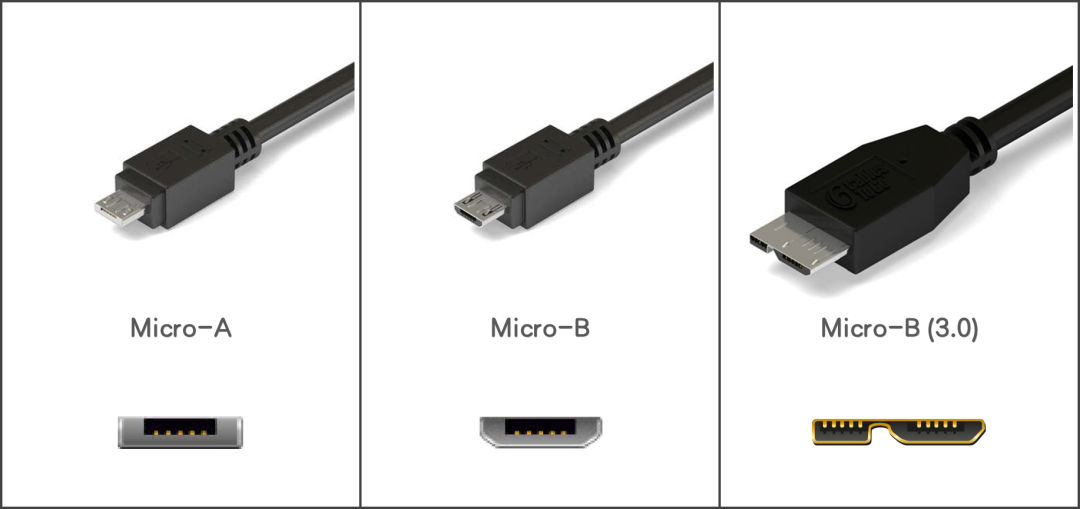
Micro USB interface is the next generation product of Mini USB interface, which increases the number of plug and unplug usages, while reducing the height by half, making it smaller and flatter. Similarly, Micro USB interfaces are also divided into Micro-A and Micro-B, as shown below:
-
Mini USB interfaces and Micro USB interfaces are distinguished according to their appearance. The Micro USB interface will have two symmetrical locks (notches) on the metal back of the plug, while the Mini USB interface usually has only one and is centered;
-
Micro-A, Micro-B and Micro-B(3.0) are distinguished according to their appearance. The Micro-A interface is a flat rectangle, while the Micro-B interface is a flat trapezoid, while Micro-B(3.0) is a fusion of flat rectangle + flat trapezoid.
The Micro-A interface is relatively rare, the Micro-B interface is common on early smartphone devices, and the Micro-B (3.0) interface is common on mobile mechanical hard disk devices.
4.Type-C interface
The Type-C interface is the latest generation interface that follows the USB4 transmission standard and supports reversible plugging and unplugging. Because the USB4 transmission standard absorbs the Thunderbolt protocol (Thunderbolt interface protocol), the Type-C interface is also compatible with the Thunderbolt interface. The diagram is as follows:
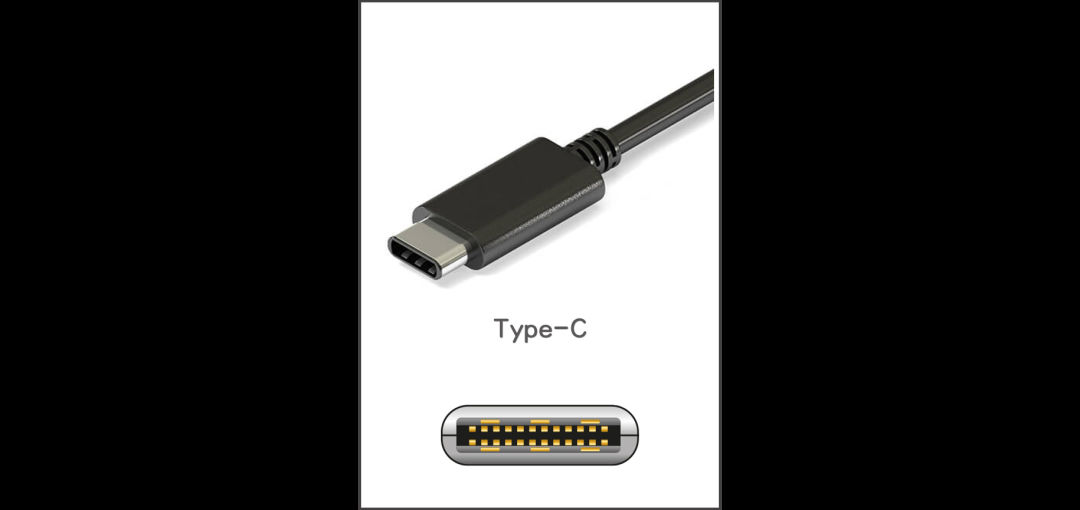
Type-C is the current mainstream USB interface and is commonly used in devices such as smartphones. Medium and large devices such as tablets, laptops, and conference tablets have also become increasingly popular in using Type-C interfaces for charging and transmitting data.
This article was moved from WordPress to MkDocs