This article explains in detail the production standards, uses, differences and functions of each core pin of network cable straight-through cables and crossover cables.
Original link: https://www.itylq.com/network-cables-detail.html
Release date: 2024-06-06 Migration time: 2026-03-21
1 What is a network cable/twisted pair?
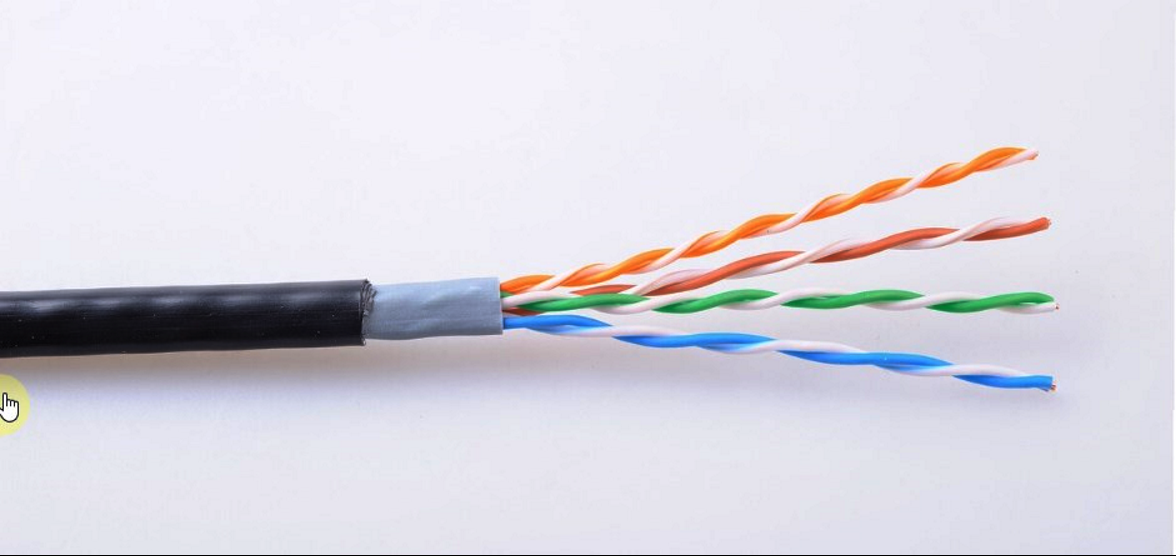
Network cable is also a type of transmission medium based on copper wire/copper cable, but unlike coaxial cable, network cable/twisted pair always appears in pairs.
- The evolution of the number of network cable cores
At the beginning, there was only one pair of network cables, namely blue core and blue and white core; as the transmission requirements increased, it was later increased to 4 cores, and the new green and white cores and green cores were placed on both sides of the blue and blue and white cores; finally, it was expanded to the current 8 cores, with a new pair of orange and white cores and orange cores on the far left, and another pair of brown and white cores and brown cores on the far right, forming a standard T568B Line sequence: orange white – orange – green white – blue – blue white – green – brown white – brown.
- The role of paired wire cores
During data transmission, the current in the wire core will generate a magnetic field, which will interfere with other wire cores. If the wire cores are paired up and twisted together, the magnetic fields they generate can cancel each other out, reducing interference.
Ps. Nowadays, you can still see many "two-knife" weak current engineers on the Internet, saying that the line sequence is not line sequence, as long as both ends are consistent... It can only be said that it can be connected, but it abruptly increases the interference between the wire cores, which seems very unprofessional.
2 Two connection specifications for network cables
EIA/TIA 568A and EIA/TIA 568B (referred to as T568A, T568B) respectively define two wire sequence standards for network cables:
-
T568A: green white, green, orange white, blue, blue white, orange, brown white, brown
-
T568B: orange white, orange, green white, blue, blue white, green, brown white, brown
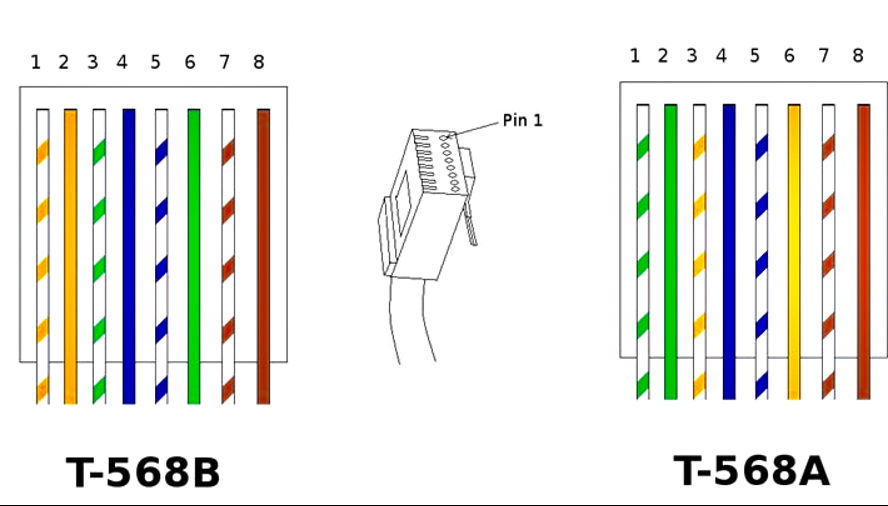
If you observe carefully, you can find that the T568A line sequence standard is obtained after the line sequence 1-3 and 2-6 are exchanged in T568B.
From which side should the network cable sequence be counted?
The metal contact side of the crystal head faces the person, and the wire core corresponding to the first contact point on the left is the starting point 1.
3 What are straight lines and crossover lines?
A network cable that uses the same wire sequence standard at both ends (T568A or T568B at both ends) is called a straight-through cable;
A network cable made using the T568A wire sequence standard on one end and the T568B wire sequence standard on the other end is called a crossover cable.
4 The purpose of straight-through lines and crossover lines
When connecting the same type of equipment, use crossover cables;
Note: Routers and network cards (all devices with network cards, such as hosts, servers, etc.) belong to the same device; switches, bridges, hubs, etc. belong to the same device.
For example: routers and routers, routers and hosts, switches and switches are all interconnected using crossover cables;
To connect dissimilar devices, use straight-through cables.
For example: use straight-through lines between routers and switches, hosts and switches, servers and switches.
5 The function of each core of the network cable
In a 100M network, cores 1 and 2 of the network cable are used to send data, and cores 3 and 6 are used to receive data, with 1 sending and 3 receiving, and 2 sending and 6 receiving;
In a Gigabit network, cores 1, 2, 3, and 6 of the network cable are used to send data, and cores 4, 5, 7, and 8 are used to receive data.
Therefore, in order for the network to reach Gigabit bandwidth, the eight wire cores of the network cable need to work together. If any one wire core is abnormal, the speed will be reduced to 100 Mbit/s.
6 Device wire core pin function
| Device name | Send data pin | Receive data pin |
|---|---|---|
| Router | 1, 2 | 3, 6 |
| Network card NIC | 1, 2 | 3, 6 |
| Switch | 3, 6 | 1, 2 |
| Bridge | 3, 6 | 1, 2 |
| Hub | 3, 6 | 1, 2 |
From this table, you can see more clearly why the same type of equipment needs to use crossover cables, and different types of equipment need to use straight-through cables.
** Take the connection between router and switch as an example: **# Use straight-through line
The router sends data from pins 1 and 2 (wire core), and the switch uses pins 1 and 2 (wire core) to receive data, in one-to-one correspondence;
The switch sends data from pins 3 and 6 (wire core), and the router uses pins 3 and 6 (wire core) to receive data, one-to-one correspondence;
Therefore, routers and switches are connected using straight-through lines;
** Take the connection between the router and the network card NIC (host, server, etc.) as an example: **# Use a crossover cable
The router sends data from pins 1 and 2 (wire cores), and the network card NIC needs to use pins 3 and 6 (wire cores) to receive data, and wire cores 1-3 and 2-6 are swapped;
The network card NIC sends data from pins 1 and 2 (wire cores), and the router uses pins 3 and 6 (wire cores) to receive data, or the wire cores 1-3, 2-6 are swapped;
Therefore, the router and the network card NIC are connected using a crossover cable.
In summary, it can be seen that because different types of devices have different pin designs for sending and receiving data, it has led to the so-called "crossover cables for the same type of equipment and straight-through cables for different types of equipment".
7 Automatic flip function
Fortunately, most of today's switches, routers, etc. support the automatic flip function. Whether it is the same type of equipment or different types of equipment, straight-through cables are generally used (it is recommended to use the T568B line sequence standard). The only exception is that direct connections between computers still require the use of crossover cables.
This article was moved from WordPress to MkDocs